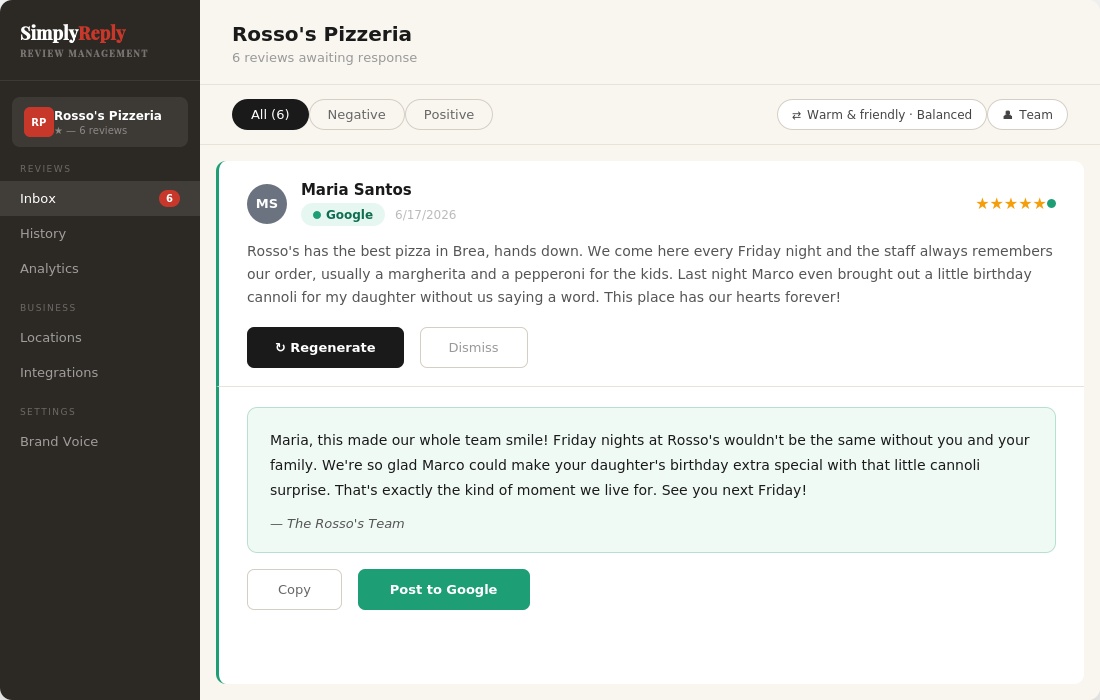
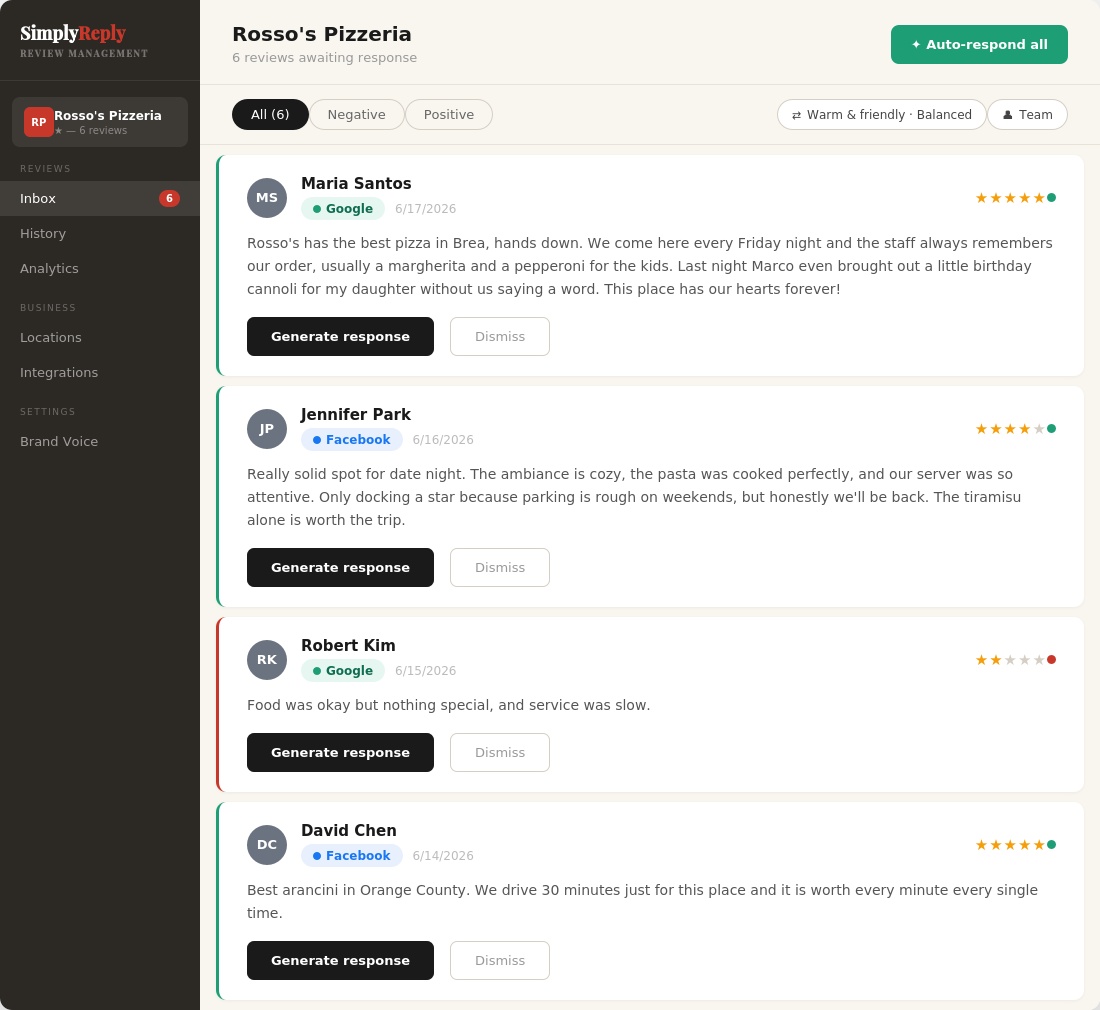
SimplyReply monitors your Google and Facebook reviews, then drafts thoughtful, professional replies that are ready for you to review and publish.
Launching this fall · Be first in line · No credit card needed
💻 Desktop · 📱 Mobile
Most businesses get reviews daily and respond to almost none of them. Every unanswered review is a signal to the next customer that nobody's home.
Your competitors are responding. Your ratings are falling behind. And the gap keeps widening.
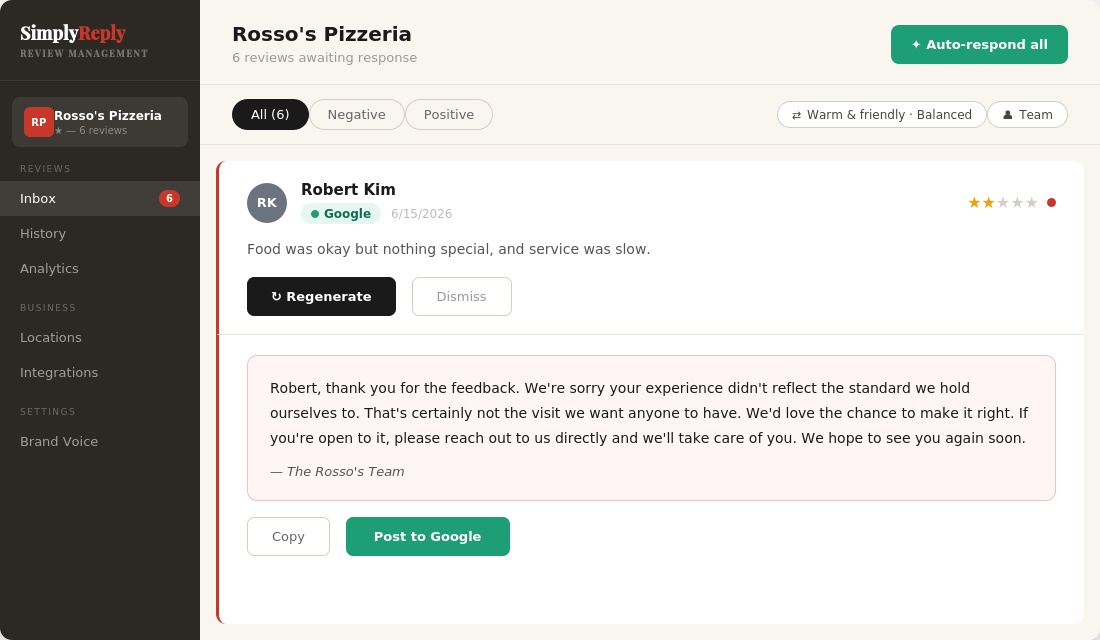
SimplyReply watches your Google and Facebook reviews and responds to them for you — AI writes professional responses in your business's tone, and sounds even more like you once you train your own voice.
🔒 Connecting your Google account verifies your identity and lets SimplyReply sync your Google reviews automatically. Nothing is ever posted without your approval.
Link your Google Business Profile and Facebook Page in minutes. SimplyReply pulls in your recent reviews so you can catch up on anything you've fallen behind on. Respond to other platforms with Reply Assistant: paste a review in, or just upload a screenshot of it.
Paste 3-5 responses you've written before. Record a 60-second voice note. Your AI learns your style, so replies sound more like you.
Review, edit, approve and post, or let Auto-Respond handle everything with a 10-second undo window. Respond on your schedule, your way. Your ratings go up. Customers come back.
No workflows to configure. No enterprise contracts. Just a tool built specifically for responding to reviews, ready in minutes.
⚠️ Partial or requires significant additional setup
Built for business owners who have better things to do than spend an hour writing review responses.
Powered by SimplyReply AI. Within seconds, you get a professional response that matches the tone you select. It actively tracks what's already been said and works to avoid repeating itself, so replies don't start sounding like the same template over and over.
Warm & Friendly, Professional, Casual & Fun, or Formal. Each voice has its own personality brief, banned phrases, and sentence style. Or skip presets entirely and use your own trained voice instead.
Paste your own past responses and record a voice note. Then switch to "Your Brand Voice" and every response is written the way you actually talk, not a preset.
Exclusive featureSimplyReply AI auto-detects the reviewer's language and responds in kind. Or lock every reply to one of 11 languages, including Spanish, Korean, Tagalog, and French.
NewChoose your persona per response. Owner replies feel personal. Manager replies feel authoritative. Team replies feel collective.
NewGenerate responses for every pending review at once. Review and edit before anything posts. 10-second undo. Nothing goes live without your approval. Currently available for Google reviews.
Get notified the moment a new review comes in, even when SimplyReply isn't open. Tap the notification, tap Draft Reply, and your AI response is ready in seconds. Post to Google in one tap, or copy and paste to Facebook in seconds.
NewFilter by last 30 days, 6 months, or 1 year to see how far behind you are, then clear it in one pass with Auto-respond.
With the click of a button, SimplyReply reads all your reviews and generates two things: what customers are loving (Glow) and what needs your attention (Grow). Actionable, specific, and ready when you are.
NewSee your sentiment breakdown, top topics customers mention, and response rates across all your locations. Your Response Activity card tracks how fast you're responding and flags anything still waiting for a reply, so nothing falls through the cracks.
Switch between locations in one click. Each location has its own review inbox, platform connections, response rules, and performance metrics — and Compare Locations shows exactly where each one is winning or falling behind, broken down by category.
Generated from your own Google Business Profile, not a generic template. Get a ready-to-print QR code that sends customers straight to your review page. Put it on receipts, table tents, or at checkout — no app, no friction, just a scan.
NewSimplyReply reads all your reviews and delivers a plain-English summary every week. No spreadsheets. No guessing. Just two things — your Glow and your Grow.
SimplyReply doesn't just change the tone. It changes the personality, word choice, and sentence structure. Every response feels like a real person wrote it.
SimplyReply was built for the small business owners keeping their communities alive, like the restaurants, salons, and shops that make a neighborhood worth living in. Too many of them lose customers to a bad online reputation that they never had time to manage. This is our way of leveling the playing field.
Stephanie Garabedian · Founder, SimplyReply
Start free for 14 days. Cancel any time.
🔒 14-day free trial · Cancel any time · Secured by Stripe
Need more than 3 locations or managing a large chain? Let's talk →
No fluff, no corporate speak. Just honest answers.
SimplyReply uses a feature called Brand Voice Training to learn how you personally write:
Once you've trained it, select "Your Brand Voice" as your default (instead of one of the 4 built-in presets) and every response uses it as the authority on how you sound.
Separately, these business settings apply no matter which voice or preset you're using, even without completing Voice Training:
The result is an AI that writes every response like you would. Not a robot, not a template.
Google is where most customers go first. Before they call, before they walk in, before they book, they search. And what they see on your Google Business Profile, your star rating, your reviews, and whether you respond, shapes their decision before they ever interact with you.
Here's why it matters more than any other platform:
And Facebook?
Facebook reviews live on your business Page and show up when people search for you directly or browse local recommendations in Facebook Groups. For certain industries like restaurants, salons, and service businesses, Facebook is where your loyal regulars hang out. Their reviews carry social proof that Google alone can't replicate.
Together, Google and Facebook cover the two places your customers are most likely to talk about you. SimplyReply makes sure you're always part of that conversation.
SimplyReply connects directly to Google Business Profile and Facebook, syncing your reviews automatically.
Note: Yelp's mobile app doesn't allow you to copy review text directly. No problem: take a screenshot of the review and upload it to Reply Assistant, and SimplyReply reads the review for you.
Yes. In Reply Assistant, tap Upload a screenshot, or on a computer drag or paste a screenshot straight into the box. SimplyReply reads the review for you: the review text, the star rating, the reviewer's name, and which site it came from, and fills it all in, ready for you to look over. Then tap Draft Reply.
It's especially handy for Yelp's mobile app, where you can't copy review text. It works best with one review per screenshot, and a review that's cut off by "Read more" should be opened in full first. If the screenshot also shows a reply from the owner, SimplyReply leaves it out and lets you know the review may already be answered. SimplyReply doesn't save your screenshot, it's only used to read the review.
Yes. SimplyReply never posts anything without your permission. By default, the app generates a response and waits for your approval. You can read it, edit it, regenerate it, or dismiss it before anything goes live.
SimplyReply also does its best to flag reviews that may need extra care, such as legal language, health complaints, discrimination, or strong negative content. When a review is flagged, it's pulled out of Auto-respond and held for your manual review. The AI still generates a response. You just need to read it carefully, make any edits, and approve it yourself before posting. This applies to both Google and Facebook reviews. Note that while we do our best, the flagging isn't perfect. We always recommend reading every response before it goes live.
New reviews sync in automatically, and Auto-respond makes it fast to generate a response using your Brand Voice settings — but you always post it yourself. SimplyReply never posts without your approval. Here's how it works by platform:
Google:
Facebook:
Reviews flagged for sensitive content will always be held for your manual review regardless of platform.
Yes! SimplyReply works on both desktop and mobile. You can manage your reviews, generate responses, and post from wherever you are, whether you're at your desk or running between tables.
SimplyReply is built for exactly this. Every negative review gets a calm, genuine response by default, a real apology and a concrete next step, never excuses or reactive language, no matter which voice you're using. Add your contact info in your location settings so the conversation can move offline. You can set your preference for handling negative reviews (apologize first, acknowledge without excuses, always invite contact, or short and professional) in your location settings. It applies no matter which voice or preset you're using, not only "Your Brand Voice." And if a review crosses into something more serious, a legal threat, a health complaint, a discrimination claim, or a personal attack with no real complaint behind it, SimplyReply flags it and holds it for your manual review instead of using the standard default, so you can give it the extra care it needs. For a personal attack, SimplyReply also shows you the exact steps to report the review to Google, Facebook, or Yelp, and lets you mark it as reported so you don't lose track. The platform decides whether to remove it, so removal is never guaranteed, but you'll know exactly where to click. Remember, how you respond to a tough review is often the first impression a new customer gets.
Most users are up and running in about 10 minutes. Connect your Google Business Profile and/or Facebook Page, pick a built-in voice preset, and SimplyReply pulls in your recent reviews so you can start responding right away. If you want replies that sound more like you, Brand Voice Training takes just a few more minutes, whenever you're ready for it.
Yes! SimplyReply supports multi-location businesses across all plans. Every plan includes access to all features. The only difference is the number of locations and staff logins:
Need more than 3 locations or managing a large chain? Let's talk
You choose! SimplyReply gives you three options:
You can set your language preference for each location — go to Locations, click Edit on the one you want to change, and set it there.
SimplyReply includes a built-in Google Review Link & QR Code generator. Once your Google Place ID is set, SimplyReply generates a direct review link and a scannable QR code you can download and use anywhere, on receipts, table tent cards, counter signage, or anywhere customers will see it. One scan takes them straight to your Google review page. More reviews coming in means more for SimplyReply to help you respond to.
SimplyReply launches this fall. Join the waitlist to be first in line. You'll get early access and a launch notification the moment the doors open.
No download or app store required. SimplyReply works right in your phone's browser, and you can add it to your home screen so it opens just like a regular app, full screen, with its own icon, no browser bar in the way. Once it's added, you'll still get push notifications when a new review comes in, and the app stays fast even on a spotty connection. It works this way on both iPhone and Android, so there's nothing extra to install and nothing to keep updated through an app store.
SimplyReply can use Google in two separate, optional ways. You can sign in with your Google account instead of setting an email and password, and, separately, you can connect your Google Business Profile so new reviews show up automatically in your Inbox instead of you copying and pasting them in by hand. Neither one is required. You can sign up with an email and password and paste reviews in manually instead. We never post anything to your Google Business Profile without you reviewing and approving it first.
Join the waitlist and be first in line when we launch this fall.
Launching this fall · Be first in line · No credit card needed