🚀 Review management for businesses

Never let a bad review
go unanswered again

SimplyReply monitors your Google and Facebook reviews, then drafts thoughtful, professional replies that are ready for you to review and publish.

Launching this fall · Be first in line · No credit card needed

💻 Desktop  ·  📱 Mobile

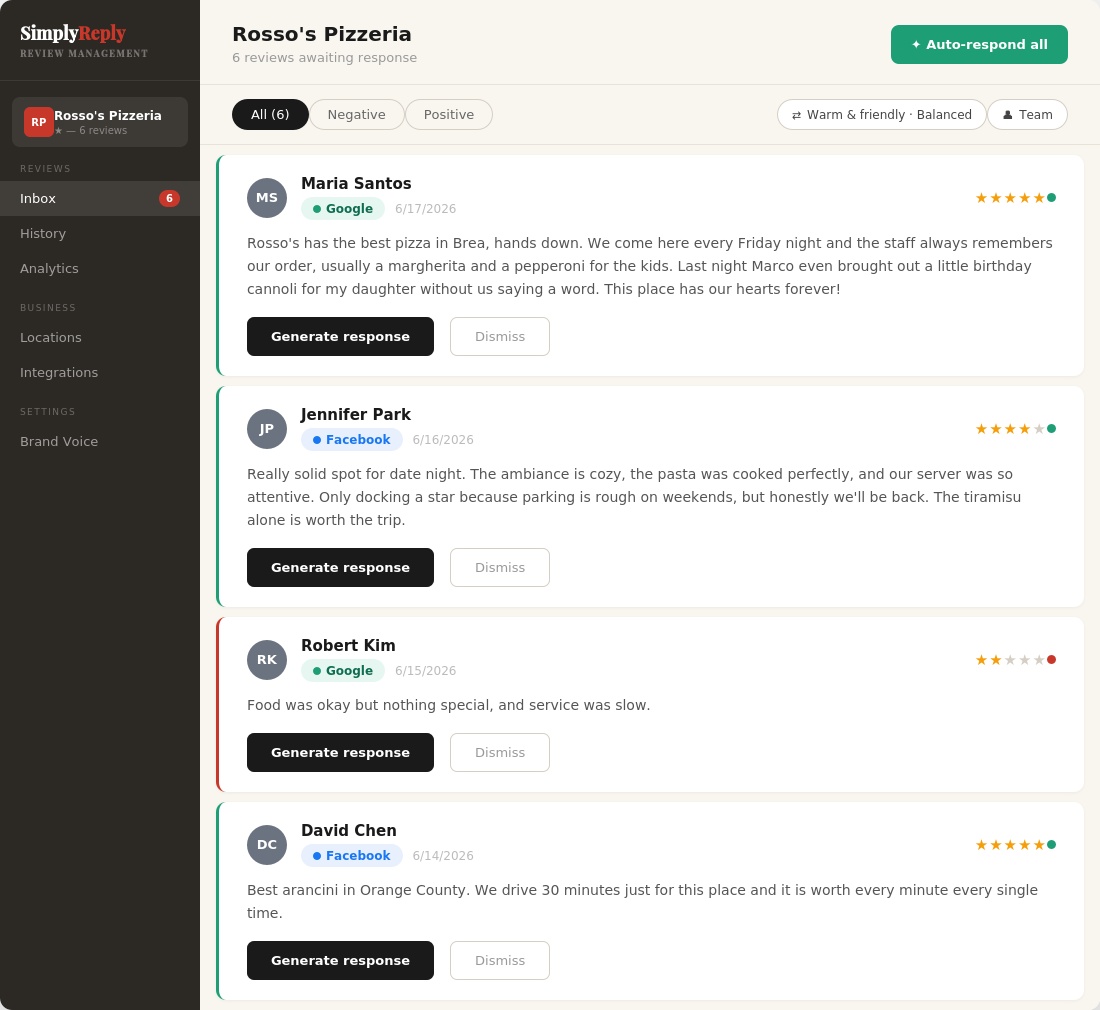
SimplyReply review inbox showing AI-generated responses for Google reviews

Your reputation is
leaking revenue
every single day

Most businesses get reviews daily and respond to almost none of them. Every unanswered review is a signal to the next customer that nobody's home.

Your competitors are responding. Your ratings are falling behind. And the gap keeps widening.

💬
52%
of customers expect a response to their reviews within 7 days
ReviewTrackers 2025
🚶
42%
of consumers are unlikely to use a business that never replies to reviews
BrightLocal, Local Consumer Review Survey 2026
📋
83%
of businesses have no active reputation management plan
ElectroIQ 2025
💰
63%
of a company's market value is tied directly to its online reputation
Weber Shandwick, 2020
89% of customers are more likely to choose a business that responds to all reviews
35% more revenue at businesses that respond to reviews
56% say a thoughtful response to a negative review improved their opinion of the business
SimplyReply responds in seconds. The average business takes 3.2 days
31% more customer spending at businesses with positive reviews
89% of customers are more likely to choose a business that responds to all reviews
35% more revenue at businesses that respond to reviews
56% say a thoughtful response to a negative review improved their opinion of the business
SimplyReply responds in seconds. The average business takes 3.2 days
31% more customer spending at businesses with positive reviews

From review to response
within seconds

SimplyReply watches your Google and Facebook reviews and responds to them for you — AI writes professional responses in your business's tone, and sounds even more like you once you train your own voice.

🔒 Connecting your Google account verifies your identity and lets SimplyReply sync your Google reviews automatically. Nothing is ever posted without your approval.

01
🔌

Connect your accounts

Link your Google Business Profile and Facebook Page in minutes. SimplyReply pulls in your recent reviews so you can catch up on anything you've fallen behind on. Respond to other platforms with Reply Assistant.

02
🧠

Train your AI voice

Paste 3-5 responses you've written before. Record a 60-second voice note. Your AI learns to sound exactly like you.

03
🚀

You make the rules

Review, edit, approve and post, or let Auto-Respond handle everything with a 10-second undo window. Respond on your schedule, your way. Your ratings go up. Customers come back.

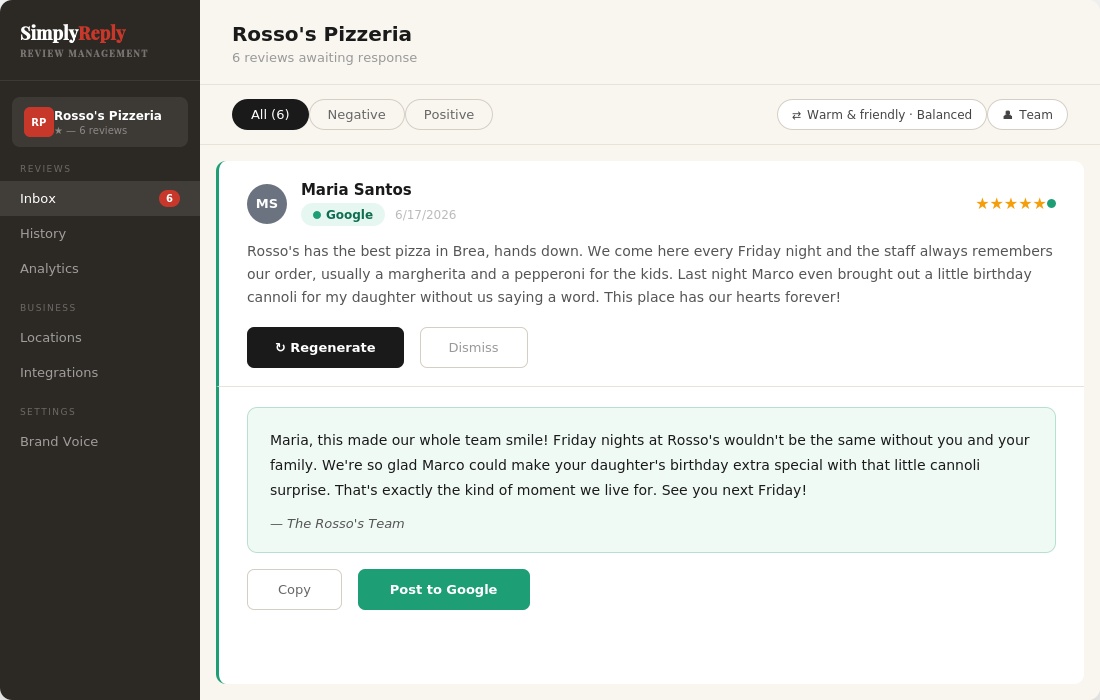
A SimplyReply AI-generated response ready to post to Google, shown alongside the original customer review
Why SimplyReply

The simpler, smarter choice
for businesses

No workflows to configure. No enterprise contracts. Just a tool built specifically for responding to reviews, ready in minutes.

SimplyReply
DIY tools
Enterprise platforms
Built for review responses
✅
❌
✅
Simple setup, ready in minutes
✅
❌
❌
Small business pricing
✅
⚠️
❌
Brand Voice Training
✅
❌
⚠️
Instant push notifications
✅
❌
⚠️
Reply Assistant for any platform
✅
❌
❌

⚠️ Partial or requires significant additional setup

Everything your reputation
needs in one place

Built for business owners who have better things to do than spend an hour writing review responses.

SimplyReply mascot

SimplyReply responses

Powered by SimplyReply AI. Within seconds, you get a professional response that matches the tone you select. It actively tracks what's already been said and works to avoid repeating itself, so replies don't start sounding like the same template over and over.

🎭

4 distinct brand voices

Warm & Friendly, Professional, Casual & Fun, or Formal. Each voice has its own personality brief, banned phrases, and sentence style. Or skip presets entirely and use your own trained voice instead.

🧬

Advanced voice training

Paste your own past responses and record a voice note. Then switch to "Your Brand Voice" and every response is written the way you actually talk, not a preset.

Exclusive feature
🌍

Responds in any language

SimplyReply AI auto-detects the reviewer's language and responds in kind: Spanish, Korean, Tagalog, French, and 50+ more. Or lock to one language.

New
👤

Respond as owner, manager, or team

Choose your persona per response. Owner replies feel personal. Manager replies feel authoritative. Team replies feel collective.

New
⚡

Auto-respond all

Generate responses for every pending review at once. Review and edit before anything posts. 10-second undo. Nothing goes live without your approval. Currently available for Google reviews.

🔔

Instant push notifications

Get notified the moment a new review comes in, even when SimplyReply isn't open. Tap the notification, tap Draft Reply, and your AI response is ready in seconds. Post to Google in one tap, or copy and paste to Facebook in seconds.

New
📅

Catch up on your backlog

Filter by last 30 days, 6 months, or 1 year to see how far behind you are, then clear it in one pass with Auto-respond.

✨

Weekly Glow & Grow summary

With the click of a button, SimplyReply reads all your reviews and generates two things: what customers are loving (Glow) and what needs your attention (Grow). Actionable, specific, and ready when you are.

New
📊

Actionable analytics

See your sentiment breakdown, top topics customers mention, and response rates across all your locations. Your Response Activity card tracks how fast you're responding and flags anything still waiting for a reply, so nothing falls through the cracks.

🏪

Multi-location management

Switch between locations in one click. Each location has its own review inbox, platform connections, response rules, and performance metrics — and Compare Locations shows exactly where each one is winning or falling behind, broken down by category.

📱

Custom review QR code

Generated from your own Google Business Profile, not a generic template. Get a ready-to-print QR code that sends customers straight to your review page. Put it on receipts, table tents, or at checkout — no app, no friction, just a scan.

New

Know exactly what's working
and what's not. Every week.

SimplyReply reads all your reviews and delivers a plain-English summary every week. No spreadsheets. No guessing. Just two things — your Glow and your Grow.

✨ Weekly Glow & Grow
Week of May 19, 2026 · OC Burger Co. · Anaheim
Generated by AI
✨ Glow — What customers love
Your truffle fries and smash burgers were mentioned in 8 of 12 reviews this week. Staff friendliness is your most praised quality. Six customers specifically called it out by name.
🌱 Grow — What needs attention
Wait time came up in 3 reviews, all during Tuesday and Thursday lunch. Parking frustration appeared twice. One customer felt the prices were high for the portion size.
📊 12 reviews this week ⭐ Avg rating 4.7 ✅ 94% responded

Same review.
Four completely different voices.

SimplyReply doesn't just change the tone. It changes the personality, word choice, and sentence structure. Every response feels like a real person wrote it.

😊 Warm & Friendly
★★★★★
"The truffle fries were incredible and the staff remembered my name from last time. This is my go-to spot."
The truffle fries earning a shoutout means a lot, and our team remembering your name? That's exactly the kind of place we're trying to be. So glad you've got a go-to spot with us. We can't wait to see you again!
💼 Professional
★★★★★
"The truffle fries were incredible and the staff remembered my name from last time. This is my go-to spot."
Remembering names and keeping food quality consistent is exactly what we aim for. We're glad the truffle fries delivered again. We'll see you next time.
🎉 Casual & Fun
★★★★★
"The truffle fries were incredible and the staff remembered my name from last time. This is my go-to spot."
Those truffle fries just hit different, huh? And remembering your name isn't an accident, that's just how we roll for our regulars. Go-to spot status: officially accepted. See you next time! 🍟
🎓 Formal
★★★★★
"The truffle fries were incredible and the staff remembered my name from last time. This is my go-to spot."
We appreciate you taking the time to share this. Consistency, in both our food and how we treat our regulars, is something we hold to a high standard, and it is rewarding to know it shows. We look forward to welcoming you back.
Reputation protection

Not every review is fair.
Respond like a pro anyway.

Some reviews are glowing. Some are confusing. And some are just plain unfair. But 85% of consumers say how a business responds is an important factor in their decision to buy (Reputation, 2024). A calm, professional response tells every future customer who's reading that you're the kind of business that shows up, even when it's hard.

SimplyReply keeps you out of your own head. No firing back in frustration. No leaving it unanswered because you didn't know what to say. Just a thoughtful, on-brand response that protects your reputation and keeps things moving.

Your response to a tough review is often the first impression a new customer gets. Make it count.

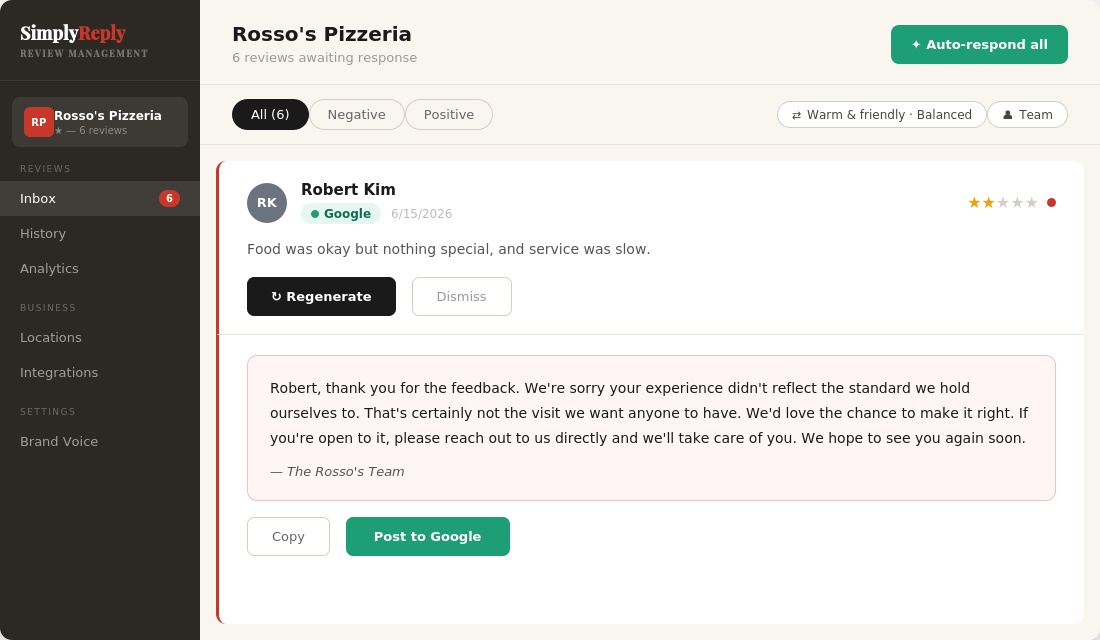
SimplyReply generating a professional response to a negative review

Responding to reviews
is not optional anymore

🙋
89%
of customers are more likely to choose a business that responds to all reviews
Social Pilot 2026
💸
35%
more revenue at businesses that respond to reviews
Search Engine Land, 2019 (200,000+ small businesses studied)
🤝
56%
say a thoughtful response to a negative review improved their opinion of the business
BrightLocal, Local Consumer Review Survey 2026
"

SimplyReply was built for the small business owners keeping their communities alive, like the restaurants, salons, and shops that make a neighborhood worth living in. Too many of them lose customers to a bad online reputation that they never had time to manage. This is our way of leveling the playing field.

Stephanie Garabedian · Founder, SimplyReply

Simple, honest pricing

Start free for 14 days. Cancel any time.

Starter
Perfect for single-location businesses
$49/mo
after 14-day free trial
  • 1 location
  • 200 AI responses / month
  • 1 staff login
  • Google & Facebook reviews
  • All brand voices + your trained voice
  • Responds in any language
  • Analytics dashboard
  • Push notifications
Join waitlist
Agency
White-label platform for marketing agencies. 3 clients included, then $29/mo per client.
$499/mo
after 14-day free trial
  • 3 client locations included
  • + $29/mo per additional client
  • 5,000 AI responses / month
  • Unlimited staff logins
  • Google & Facebook reviews
  • All brand voices + your trained voice
  • Responds in any language
  • Analytics dashboard
  • Push notifications
  • White-label branding
  • Reseller program
  • Priority support
Join waitlist

🔒 14-day free trial · Cancel any time · Secured by Stripe

Need more than 3 locations or managing a large chain? Let's talk →

FAQ

Everything you want to know

No fluff, no corporate speak. Just honest answers.

How does SimplyReply know how to sound like me?

▾

SimplyReply uses a feature called Brand Voice Training to learn how you personally write:

  • Paste your own responses. Share 3-5 replies you've already written so the AI learns your natural tone.
  • Voice note. Record a short voice note so the AI can learn how you actually speak.

Once you've trained it, select "Your Brand Voice" as your default (instead of one of the 4 built-in presets) and every response uses it as the authority on how you sound.

Separately, these business settings apply no matter which voice or preset you're using, even without completing Voice Training:

  • Response rules. Set "always include" and "never say" rules. For example: always thank them by name, never use the word "unfortunately."
  • Response behavior. Do you use humor? How do you use exclamation points and emojis? How do you handle negative reviews? Apologize first? Acknowledge the issue? Always invite them to reach out directly?
  • Contact information. Include your phone number, email, or website in responses, especially for negative reviews where you want to take the conversation offline.
  • Sign-off style. Respond as the Owner, Manager, or Team, with a personal or professional sign-off.
  • Custom rules. A free-text field for anything else the AI should know about your business or style.

The result is an AI that writes every response like you would. Not a robot, not a template.

Why does Google matter so much for my business?

▾

Google is where most customers go first. Before they call, before they walk in, before they book, they search. And what they see on your Google Business Profile, your star rating, your reviews, and whether you respond, shapes their decision before they ever interact with you.

Here's why it matters more than any other platform:

  • Google controls local search. When someone searches "best pizza near me" or "nail salon in Fullerton," Google decides who appears in results. Businesses with more reviews, higher ratings, and active owner responses rank higher.
  • Responding to reviews is a ranking signal. Google has confirmed that responding to reviews improves your local search visibility. It's not just good customer service. It's SEO.
  • 93% of customers read reviews before visiting a business. And they notice whether the owner responds.

And Facebook?

Facebook reviews live on your business Page and show up when people search for you directly or browse local recommendations in Facebook Groups. For certain industries like restaurants, salons, and service businesses, Facebook is where your loyal regulars hang out. Their reviews carry social proof that Google alone can't replicate.

Together, Google and Facebook cover the two places your customers are most likely to talk about you. SimplyReply makes sure you're always part of that conversation.
Which platforms does SimplyReply support?

▾

SimplyReply connects directly to Google Business Profile and Facebook, syncing your reviews automatically.

  • Google. Responses post with one tap directly from the app.
  • Facebook. When you're ready to respond, SimplyReply copies your response and opens your Facebook Reviews tab directly. Just tap the review and paste. Done.
  • Yelp, TripAdvisor, Airbnb, and more. Use Reply Assistant. Copy the review text, paste it into SimplyReply, and get a polished, on-brand draft reply in seconds. Reply Assistant follows whichever voice setting you've chosen in the app — a preset, or your own trained voice for responses that read like you wrote them yourself, no matter where the review came from.

Note: Yelp's mobile app doesn't allow you to copy review text directly. A quick workaround is to screenshot the review and use your phone's built-in text recognition to copy it, then paste it into SimplyReply.

Do I have to approve every response before it posts?

▾

Yes. SimplyReply never posts anything without your permission. By default, the app generates a response and waits for your approval. You can read it, edit it, regenerate it, or dismiss it before anything goes live.

SimplyReply also does its best to flag reviews that may need extra care, such as legal language, health complaints, discrimination, or strong negative content. When a review is flagged, it's pulled out of Auto-respond and held for your manual review. The AI still generates a response. You just need to read it carefully, make any edits, and approve it yourself before posting. This applies to both Google and Facebook reviews. Note that while we do our best, the flagging isn't perfect. We always recommend reading every response before it goes live.

How does Auto-respond work?

▾

New reviews sync in automatically, and Auto-respond makes it fast to generate a response using your Brand Voice settings — but you always post it yourself. SimplyReply never posts without your approval. Here's how it works by platform:

Google:

  1. A new review comes in (synced every 2 hours)
  2. You get a push notification letting you know
  3. Open the app and tap Draft Reply — SimplyReply generates a response using your Brand Voice
  4. Review it and tap Post to Google

Facebook:

  1. A new review comes in (synced every 2 hours)
  2. You get a push notification letting you know
  3. Open the app and tap Draft Reply — SimplyReply generates a response using your Brand Voice
  4. Tap Copy & open Facebook. Your response is copied and Facebook opens directly to your Reviews tab
  5. Tap the review and paste

Reviews flagged for sensitive content will always be held for your manual review regardless of platform.

Does it work on my phone?

▾

Yes! SimplyReply works on both desktop and mobile. You can manage your reviews, generate responses, and post from wherever you are, whether you're at your desk or running between tables.

What if I get a really bad or unfair review?

▾

SimplyReply is built for exactly this. Every negative review gets a calm, genuine response by default, a real apology and a concrete next step, never excuses or reactive language, no matter which voice you're using. Add your contact info in your location settings so the conversation can move offline. If you complete Voice Training and switch to "Your Brand Voice," your specific preference for handling negative reviews (apologize first, acknowledge the issue, or invite contact) is followed exactly; the built-in presets always use the calm, apology-first default. Remember, how you respond to a tough review is often the first impression a new customer gets.

How long does setup take?

▾

Most users are up and running in about 10 minutes. Connect your Google Business Profile and/or Facebook Page, complete your Brand Voice Training, and SimplyReply pulls in your recent reviews. You can start responding immediately.

Can I have multiple locations?

▾

Yes! SimplyReply supports multi-location businesses across all plans. Every plan includes access to all features. The only difference is the number of locations and staff logins:

  • Starter. 1 location, 1 staff login ($49/mo)
  • Pro. 3 locations, 1 staff login per location ($149/mo)
  • Agency. Designed for marketing agencies or consultants managing online reputation for multiple client businesses. Includes 3 client locations to start, each with their own settings and Brand Voice, all managed from one dashboard. Add more clients at $29/mo each. Unlimited staff logins so your whole team can collaborate. ($499/mo)

Need more than 3 locations or managing a large chain? Let's talk

What languages does it respond in?

▾

You choose! SimplyReply gives you three options:

  • Match the review. Respond automatically in whatever language the customer wrote in.
  • Always respond in a specific language. Set English, Spanish, Tagalog, or any of the 50+ supported languages as your default, regardless of what language the review is written in.
  • Mix and match by location. If you have multiple locations serving different communities, each location can have its own language setting.

You can set your language preference for each location — go to Locations, click Edit on the one you want to change, and set it there.

How do I get more reviews in the first place?

▾

SimplyReply includes a built-in Google Review Link & QR Code generator. Once your Google Place ID is set, SimplyReply generates a direct review link and a scannable QR code you can download and use anywhere, on receipts, table tent cards, counter signage, or anywhere customers will see it. One scan takes them straight to your Google review page. More reviews coming in means more for SimplyReply to help you respond to.

When does SimplyReply launch?

▾

SimplyReply launches this fall. Join the waitlist to be first in line. You'll get early access and a launch notification the moment the doors open.

Do I need to download SimplyReply from the App Store?

▾

No download or app store required. SimplyReply works right in your phone's browser, and you can add it to your home screen so it opens just like a regular app, full screen, with its own icon, no browser bar in the way. Once it's added, you'll still get push notifications when a new review comes in, and the app stays fast even on a spotty connection. It works this way on both iPhone and Android, so there's nothing extra to install and nothing to keep updated through an app store.

Why does SimplyReply ask to connect my Google account?

▾

SimplyReply asks for Google sign-in for two things: to verify your identity when you log in, and, if you choose to connect it, to read your business's Google review data so new reviews show up automatically in your Inbox instead of you having to copy and paste them in by hand. We never post anything to your Google Business Profile without you reviewing and approving it first, and connecting your Google account is optional — you can use SimplyReply by pasting reviews in manually instead.

Your next customer is
reading your reviews
right now.

Join the waitlist and be first in line when we launch this fall.

Launching this fall · Be first in line · No credit card needed

🏠 Home ❓ FAQ ✉️ Join waitlist 💳 Pricing 👋 About